

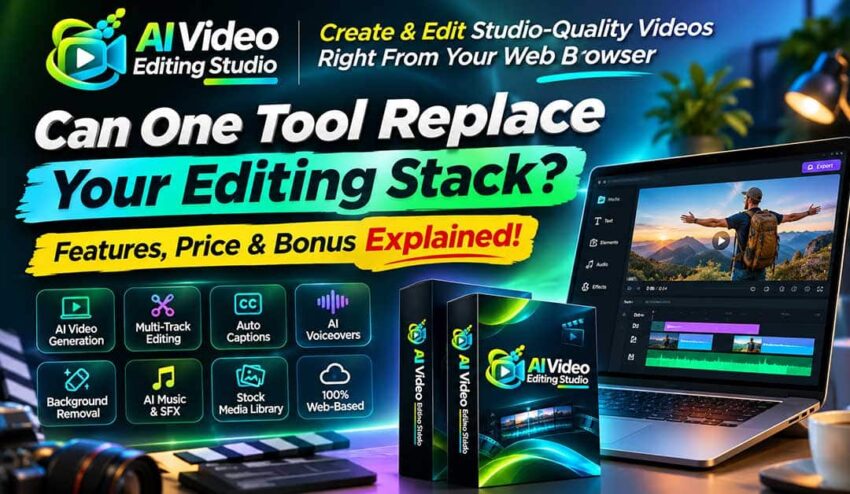
It takes hours to create professional-looking videos. You would need editing software, stock footage, captions, background music, voiceovers and sometimes different tools just for finishing one video.
This is the problem that AI Video Editing Studio tries to solve.
AI Video Editing Studio is an all-in-one browser-based video editing platform which combines traditional editing tools with AI-powered features. You do not have to switch between multiple applications as the idea is to manage much of your video creation process in one place.
But the questions here are:
- Does that make it a practical alternative to established editors?
- Is the low one-time price enough to get everything you need?
In this AI Video Editing Studio review, I have evaluated its official sales page, advertised workflow, features, pricing and available upgrade information over a seven-day review period.
Let us delve into this AI Video Editing Studio review and see what I found.
AI Video Editing Studio at a Glance
|
Category |
Details |
|
Product |
AI Video Editing Studio |
|
Product type |
Browser-based AI video editing platform |
|
Main purpose |
Create and edit videos by using AI-assisted tools |
|
Editing interface |
Multi-track timeline editor |
|
Advertised features |
AI video generation, captions, voiceovers, background removal, music and effects |
|
Front-end price |
$14.95 one-time on the official page |
|
Money-back guarantee |
30 days advertised |
|
Installation |
No software installation advertised |
|
Best suited for |
Content creators, marketers, beginners and small businesses |
|
My evaluation |
Based on the sales page, advertised workflow and offer details and not hands-on paid-account testing |
My rating: 4/5.
The biggest attraction is the combination of editing and AI tools in one browser-based platform. But still the buyers need to verify usage limits, export restrictions and any additional costs before making a purchase.
What is AI Video Editing Studio?
AI Video Editing Studio is an online video creation and editing platform which is designed for helping users in producing videos without the need of relying on traditional editing software.
It combines a timeline-based editor with AI-assisted features. As per the sales page:
- Users can upload their own media
- Work with built-in stock resources
- Add text and transitions
- Generate captions
- Use AI tools for voiceovers
- Background removal
- Music and video creation
The platform also offers different video formats like landscape, vertical and square.
This can be useful if you have been creating content for YouTube, Instagram, TikTok, Facebook or other online platforms.
There is a distinction which is very important for you to understand:
Having several tools available in one platform does not mean that every feature is unlimited or that the software can help in replacing professional editing applications.
How does AI Video Editing Studio work?
The workflow is pretty straightforward:
A. Access the platform
The platform is browser-based and so you do not have to install a traditional desktop editing application.
You can access the editor online and begin working there.
B. Upload or select your media
You get to use your own videos and images or explore the built-in stock library as advertised on the sales page.
This provides you with a starting point for creating content.
C. Edit your video
The multi-track timeline editor lets you arrange video clips, add texts, insert transitions and organize different elements.
This is the place where the platform’s traditional editing functionality comes into play.
D. Use AI-powered tools
The sales page offers several AI-assisted features like:
- Automatic captions
- AI voiceovers
- Background removal
- AI-generated videos
- AI music and sound effects
These tools help in reducing some of the manual work which is involved in video production.
E. Prepare your final video
You get to work with different aspect ratios on the basis of the platform or content format that you are targeting.
You need to check the available export resolutions, formats and usage restrictions in the actual offer before making a purchase.
AI Video Editing Studio Features
I am listing down the main features as advertised by the platform:
a. Multi-track timeline editor
The platform offers a timeline-based editing interface.
This is important as video creation is not just about generating clips but you often need to arrange footage, combine multiple elements, add texts and adjust the sequence.
A timeline editor provides you with more control than a basic template-based video generator.
b. AI video generator
AI video generator is one of the most attractive features as the idea is to make video creation much easier by the use of AI and not building every visual element manually.
But it is not clear how many generations are included in the front-end offer of if usage is unlimited on the official sales page.
c. Automatic captions
It can be very time-consuming when adding captions manually especially if you have been publishing videos on a regular basis.
The advertised caption feature helps in reducing that work.
It is best for short-form content where the captions can make videos easier to follow.
d. AI voiceovers
The platform also offers AI-generated voiceovers.
This can be useful for explainer videos, promotional content, tutorials and faceless video channels.
But still you would need to check the voice quality, available voices, language support and usage limits before replying on it completely for regular production.
e. Background remover
Removing a background helps in creating promotional videos, product presentations or other visual content.
If you have this feature along with the editing tools then it may reduce the need of using a separate application.
f. Built-in stock library
The sales page offers access to stock media resources.
This can help in saving time when you do have suitable footage or images of your own.
You need to make sure that you have understood the licensing terms for any stock assets that you can use commercially.
g. Music and sound effects
Background music and sound effects help in making videos more engaging.
AI Video Editing Studio promotes these options as part of its editing environment.
You need to check inside the offer the exact available library and usage allowances.
h. Multiple video formats
The platform offers landscape, vertical and square video formats as per its sales page.
This can be useful as different platforms need different dimensions.
Like, a YouTube video and an Instagram Reel typically need different layouts.
What benefits could you get from AI Video Editing Studio?
The main benefit here is convenience.
You do not have to manage separate tools for editing, captions, voiceovers and background removal as you get to handle several of these steps in one environment.
I am listing down the advantages that stand out:
- Less tool switching: There are multiple advertised features which are available within one platform
- Simpler video production: AI-assisted tools help in reducing repetitive editing tasks
- Beginner-friendly starting point: A browser-based workflow might feel less intimidating than professional desktop editing software
- Flexible content formats: Landscape, vertical and square formats support different publishing needs
- Potential time savings: Captions, voiceovers and background removal might help reduce the manual work.
These are some potential benefits on the basis of advertised features. The actual time savings is dependent on video complexity, output quality and how much editing that you will still need to do.
My 7-day evaluation of AI Video Editing Studio
I am clearly stating for this section that I did not conduct a seven-day paid-account test.
This is a seven-day evaluation of the official presentation, advertised workflow, pricing and available offer information of the product.
Here is how I assessed it:
Day 1: Understanding the offer
My first focus is understanding what the product is actually offering.
The main attraction is its combination of a timeline editor and AI-powered tools.
It does not present itself as just another AI video generator rather it tries to cover several stages of video production.
Day 2: Reviewing the editing workflow
The multi-track timeline editor is a very important part of the offer.
It states that the users can do more than generating a video and downloading it. They can also arrange and edit different elements.
This is a much useful distinction for anyone who is looking for more control over the final result.
Day 3: Looking at the AI tools
I just focused on the advertised AI features:
- Captions
- Voiceovers
- Video generation
- Background removal
- Music and sound effects
The combination looks convenient but the sales age alone cannot establish how well each of the features is performing in the real-world projects.
Day 4: Considering content creation needs
I have considered all types of users who might want to benefit from the platform.
The all-in-one workflow can be appealing for social media creators, affiliate marketers, small businesses and people who are producing faceless content.
But if you are someone who is producing much complex videos then you might still need more advanced editing capabilities.
Day 5: Reviewing and pricing
The current AI Video Editing Studio price is $14.95 one-time for front-end.
This is an attractive entry price for a platform which is advertising several editing and AI tools.
The important question here is what the initial purchase actually offers especially regarding AI usage, project limits and exports.
Day 6: Checking the Upgrade structure
The sales funnel might present additional AI Video Editing Studio upgrades after the initial purchase.
These can be relevant for buyers who would need more capacity or advanced functionality. But, I am not able to find a complete AI Video Editing Studio upgrade list, exact prices or current feature entitlements through the official checkout.
I am not going to treat third-party AI Video Editing Studio upgrade descriptions as confirmed products specifications.
Day 7: Reaching a verdict
I think that AI Video Editing Studio has a very appealing concept.
It brings together many useful production tools under one roof and its advertised entry price makes it worth investigating.
But I won’t recommend you to buy it solely because the sales page makes the video production sound effortless.
Check the actual limits, export options and included features first.
AI Video Editing Studio complaints and limitations
No software is perfect and there are a few areas that need to be looked at before making a purchase.
a. Front-end usage limits need clarification
The official sales page does not clearly state every project, export or AI usage allowance.
There are some third-party reviews which report restrictions on the initial offer but do not clearly state the exact limits.
I would advise you to check the purchase terms before thinking that you have unlimited usage.
b. AI output may need editing
AI-generated videos, captions and voiceovers are not perfect.
You might still need to correct errors, adjust timing, improve visuals and refine the final output.
AI can assist with production but it cannot replace creative judgement.
c. Not necessarily a professional editing replacement
The platform offers a timeline editor and several AI tools but that does not mean that it can offer the same depth as advanced professional editing software.
Users who are in need of detailed color grading, complex effects or highly specialized production workflows need to evaluate it very carefully.
d. Additional purchases may be offered
The front-end might not be the only purchase opportunity.
Buyers may encounter optional AI Video Editing Studio upgrades after purchasing. You need to check their availability, exact contents and prices during the checkout process.
e. Commercial licensing needs attention
The sales page offers commercial use.
But still you cannot assume that each and every included stock asset, Ai-generated element or third-party resources has identical licensing terms.
You need to review the actual license before using the content for client work or commercial projects.
AI Video Editing Studio price and optional upgrades
The current AI Video Editing Studio price for the front-end is $14.95 as one-time payment along with a 30-day money-back guarantee.
At this price, you will be getting a browser-based editor and a collection of AI-assisted video creation features.
What about AI Video Editing Studio OTOs and Upgrades?
The purchase funnel might offer additional AI Video Editing Studio upgrades after the initial transaction.
These additional offers are mainly for buyers who are looking for more functionality, greater capacity or additional resources beyond the basic package.
But, I was not able to find the complete current AI Video Editing Studio upgrade structure. And this is why I am not going to list individual OTO names, prices or feature claims as confirmed facts.
You need to ask yourself the following questions before accepting an upgrade:
- Does the front-end version already cover my needs?
- Is the upgrade genuinely necessary for my workflow?
- Does it remove a specific usage restriction?
- Is the payment one-time or recurring?
- Are the additional features clearly explained?
- Can I achieve the same result with tools that I already own?
I would advise you to start by evaluating the front-end package. Do not purchase optional AI Video Editing Studio upgrades just because the sales funnel is presenting them as essential.
AI Video Editing Studio Strengths and Weaknesses
|
Strengths |
Weaknesses |
|
Browser-based platform |
Exact front-end usage limits need clarification |
|
Multi-track timeline editor |
AI output might need manual adjustments |
|
Multiple AI-assisted tools |
Advanced capabilities might need additional purchases |
|
Supports different video formats |
Not proven to replace professional editors |
|
Built-in stock resources advertised |
Licensing terms need to be checked |
|
$14.95 one-time price displayed |
Current upgrade details are not independently verified |
|
30-day money-back guarantee |
Actual refund terms need to be reviewed |
Who should buy AI Video Editing Studio?
AI Video Editing Studio can be a good choice for you if you are:
- A beginner who is looking for an accessible video editing workflow
- A content creator who produces social media videos regularly
- An affiliate marketer creating promotional videos
- A small business owner who needs basic video content
- A creator who is interested in combining editing and AI-assisted tools
Who should not buy AI Video Editing Studio?
You might want to skip AI Video Editing Studio if you are:
- A professional editor who is looking for advanced production controls
- Someone who needs guaranteed unlimited AI generations
- A creator who already has a complete editing workflow
- Someone who is expecting AI to create polished, publish-ready video without the need of manual work
Is AI Video Editing Studio legit or a scam?
I find AI Video Editing Studio legit as it is a real software with an advertised set of video editing and AI-assisted features.
I did not find any such verified evidence that I can label AI Video Editing Studio a scam.
But it does not mean that every marketing claim made by AI Video Editing Studio is automatically proven.
The important questions here are:
- Are the features working as advertised?
- What does the front-end purchase include?
- If the limitations are acceptable for your needs?
I think of the offer as being a genuine software product but the buyers need to verify the checkout details, licensing terms and refund conditions before making a purchase,
Frequently Asked Questions (FAQs) –
1. What is AI Video Editing Studio?
AI Video Editing Studio is a browser-based editing platform which offers a timeline editor, AI video generation, captions, voiceovers, background removal, music and sound effects.
2. How much does AI Video Editing Studio cost?
The AI Video Editing Studio price for the front-end currently is $14.95 for one-time payment. You should always check the current checkout price before making a purchase.
3. Does AI Video Editing Studio require installation?
It is a browser-based platform so you do not need to install the software in the traditional manner.
4. Can beginners use AI Video Editing Studio?
AI Video Editing Studio is a combination of editing and AI-assisted features which may be appealing for beginners. But the actual learning experience needs to be assessed through a demo or trial if available.
5. Does it create videos automatically?
The platform offers AI video generation and other automated features. The amount of manual work needed is dependent on the project and the quality that you want.
6. Does AI Video Editing Studio include voiceovers?
AI voiceovers are among the features advertised on its sales page. You need to check the included voice options and usage allowances.
7. Are AI Video Editing Studio upgrades compulsory?
Optional upgrades might be presented to you after the initial purchase. You need to review what the front-end package included before deciding if any additional purchase is necessary.
8. Does AI Video Editing Studio offer a money-back guarantee?
The official sales page states a 30-day money-back guarantee. You need to read the actual refund policy and conditions before making a purchase.
Final Verdict
After going through the offer, I now understand why AI Video Editing Studio might be attractive to content creators and beginners.
The biggest selling point here is convenience.
AI Video Editing Studio combines a multi-track editing environment with AI-assisted features like captions, voiceovers, background removal, video generation and audio resources.
The current AI Video Editing Studio price is $14.95 a one-time payment for the front-end. It is quite inexpensive which makes it an interesting option to investigate.
But there are some important questions which remain:
- The exact font-end usage limits
- AI allowances
- Complete upgrade structure needs clearer confirmation
The platform does simplify video production but you should not see it as a guaranteed replacement for professional editing software.
My final rating: 4/5
If you are someone who is interested in exploring an affordable, all-in-one video editing workflow and if your requirements are relatively straightforward then you should consider AI Video Editing Studio.
But you should be more cautious if you need unlimited AI usage, advanced professional controls or a fully verified commercial production setup.
I would recommend you to check the front-end inclusions, licensing, refund terms and optional upgrade costs before making a decision.
AI Video Editing Studio is quite attractive as an entry-level creation solution but the real value is dependent on what the initial purchase is actually allowing you to do.