

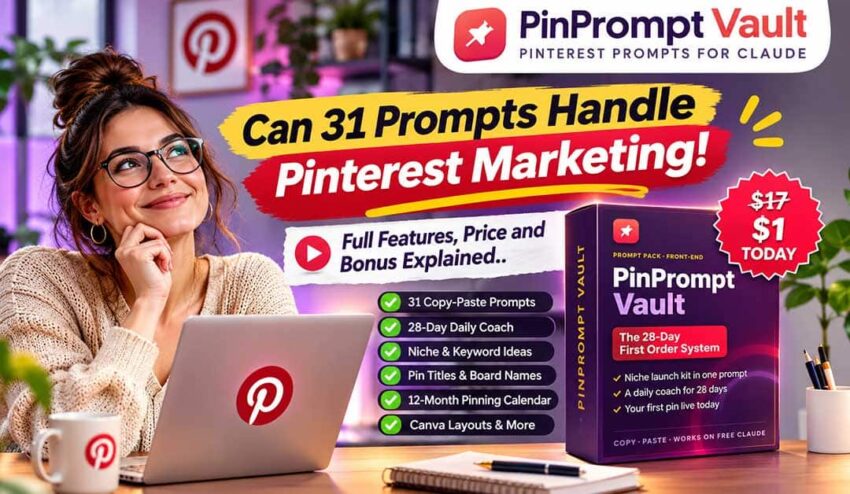
You know, you can use Pinterest as a great source of organic traffic by selling products online. If you are an Etsy seller, Amazon affiliate or someone who is trying to grow a small online business then through the platform you will get an opportunity to reach people who are already searching for ideas and products.
But there is a problem.
Getting traffic from Pinterest is not just about uploading attractive images. You would need to understand what people are searching for, choose the right keywords, create engaging pins, write descriptions and publish with consistency.
And if you are new to Pinterest marketing then figuring out all of these things can feel like starting five different projects at once.
This is the exact problem which caught my attention when I discovered PinPrompt Vault.
It is an AI-powered Pinterest marketing system which uses ready-made Claude prompt, keyword research instructions, content creation resources and a 28-day action plan in order to help beginners in organizing their marketing activities.
But there is a very important question:
If Claude is already free then why should anyone pay for PinPrompt Vault?
Let us delve into this PinPrompt Vault review and go through the examination I did for seven-days in order to understand what the prompts actually help with and evaluate if the complete package offers enough value for justifying the purchase.
This PinPrompt Vault review covers its features, pricing, complaints, legitimacy, OTOs, upgrades and the limitations that you need to understand before buying.
Let us get into it.
PinPrompt Vault at a Glance
|
Particulars |
Details |
|
Product name |
PinPrompt Vault |
|
Creator |
Mason Cao (launch listing attribution) |
|
Category |
AI Pinterest Marketing |
|
Main purpose |
Pinterest content creation and marketing guidance |
|
Core package |
31 copy-and-paste prompts |
|
Action plan |
28 day Daily Coach |
|
AI platform |
Claude |
|
AI subscription |
Free Claude plan supported |
|
Front-end price |
$1 launch price |
|
Regular price |
$17 |
|
Refund policy |
30 days |
|
Payment type |
One-time payment |
|
Rating |
4.4/5 |
What is PinPrompt Vault?
PinPrompt Vault is a collection of ready-made AI prompts which is designed for simplifying Pinterest marketing.
Just think of it as if you are getting a structured instruction library for Claude.
You do not have to open an AI chatbot and repeatedly ask it for researching products, suggesting keywords, creating titles and writing descriptions as you are getting prompts designed for these specific tasks.
The core idea is pretty simple:
- Enter your niche
- Use the relevant prompts
- Let Claude help you in preparing Pinterest marketing materials
Just imagine that you are an Etsy seller who is promoting printable planners.
You would need product ideas, relevant search terms, Pinterest board names, attractive pin titles and a content calendar.
PinPrompt Vault offers you prompts which help in generating these resources instead of writing every instruction by yourself.
The Niche Autopilot generates a launch kit containing:
- 30 product ideas.
- Buyer search words.
- 5 Pinterest boards.
- 30 pin titles.
- A 12-month pinning calendar.
The system also offers a Daily Coach which guides you through 28 days of marketing activities.
PinPrompt Vault also offers separate workflows for sellers and affiliate marketers.
Sellers can easily focus on listings, product photos and buyer replies as affiliates get guidance for bridge pages, roundups and affiliate disclosures.
This is how the system becomes relevant for more than one type of online business.
PinPrompt Vault is not an automated Pinterest publishing tool as it just gives you prompts and instructions but you will still have to review the generated content, create your designs and publish your pins.
How does PinPrompt Vault work?
The workflow of PinPrompt Vault revolves around three main stages:
Enter your niche once
You can start by entering information about your business and selected niche.
The Start Here section is designed for carrying this information into the relevant prompts, saving you from repeatedly explaining your business to Claude.
Like if your niche is home organization then the generated suggestions will focus on storage products, organising ideas and related buyer interests.
2. Generate your Pinterest marketing materials
Then you can copy the appropriate prompt and paste it into Claude’s free version.
On the basis of your task, you can generate product ideas, search terms, Pinterest board names, pin titles, descriptions and creative hooks.
You can then use Canva layouts for creating your graphics.
Affiliate marketers can also get guidance for creating bridge pages using Google Sites.
The important thing here is that you are not just asking Claude random questions but you are following a collection of prompts designed around a particular marketing workflow.
3. Follow the 28-Day Daily Coach
This is the stage where PinPrompt Vault tries to solve another common problem which is consistency.
The Daily Coach offers you specified tasks for each day along with instructions and estimated completion times.
You can simply type a command such as ‘Day 5’ and receive the relevant tasks.
If you fall behind then BEHIND command can help you with reorganization of the remaining activities.
The advertised workflow is of approximately 15 to 45 minutes after the initial setup.
The structure is useful for you if you are interested in starting marketing projects but struggle in maintaining a consistent routine.
My 7-day PinPrompt Vault Evaluation
I wanted to understand how the first seven-days actually look in place of just repeating the product’s feature list.
And in order to keep this PinPrompt Vault review transparent, I am making it clear that I have not independently tested it for seven-days but instead it is an evaluation of the advertised seven-day workflow, including what a beginner can reasonably expect to accomplish.
Day 1: Finding your starting point
The first day would be focusing on choosing your niche and preparing your initial marketing materials.
You will enter your business information and use the Quick Win prompts in order to start developing your first Pinterest content.
The advertised setup takes about 60 minutes for sellers and 90 minutes for affiliates.
Affiliates also get guidance for creating a free starter page using Google Sites.
What is the best thing about this approach is that it provides beginners a defined starting point rather than leaving them to figure out everything independently.
Day 2: Discovering products and buyer keywords
The next step is about understanding the products and search phrases which are relevant to your niche.
This is important as Pinterest users are not always looking for general inspiration. There are many who are searching for specific products, solutions and ideas.
The prompts can help you with exploring buyer-focused search terms and potential product opportunities.
But you should check the AI-generated suggestions against actual Pinterest search results instead of treating them as verified search-volume data.
Day 3: Creating Pinterest boards and titles
After understanding your niche, you can start organizing your content.
The advertised Niche Autopilot generates five board ideas and 30 pin titles.
If you are someone who is struggling with content ideas then this can help in removing a considerable amount of initial planning.
You will still need to select the most relevant suggestions and make sure that they are able to match your products.
Day 4: Designing your first pins
Here comes the visual part.
You get to use the included Canva layouts and 50 hook formulas for developing Pinterest graphics.
The goal is about creating pins which can communicate a clear benefit and encourage the right audience to click.
One thing to clearly understand is that just by creating attractive designs you are not going to get guaranteed engagement.
The message, product relevance and overall quality is important too.
Day 6: Organizing your content strategy
At this stage, you will find the Pin Tracker spreadsheet very useful.
You get to record your publishing activity, organising your content and keeping track of the work you have completed.
The system also offers a 12-month pinning calendar so that you get help with longer-term planning.
This can be helpful for you as Pinterest marketing is not about randomly posting whenever you remember.
Day 7: Reviewing your progress
The last day is about reviewing your setup and identifying what needs to be improved.
You can revisit your product ideas, keywords, boards, titles, graphics and destination page.
The question here is:
Are you going to get hundreds of visitors or affiliate commissions after seven days?
There is no reliable basis for promising that.
The purpose of this 7-day framework is to establish the workflow and should not be seen as a guarantee of any particular financial result.
Through this seven day roadmap, you are getting a reasonable starting roadmap for someone who has never organised a Pinterest marketing campaign before.
PinPrompt Vault Features
A. 31 copy and paste Claude prompts
These prompts make the foundation of PinPrompt Vault.
The collection has Quick Win, Niche Autopilot, Daily Coach and 28 step-by-step prompts.
These are designed for covering different stages of the marketing process, reducing the need of writing complicated AI instructions from scratch.
B. Niche autopilot
This is one of the most interesting components.
You just enter a niche and then use the system for generating a complete starting kit which contains product ideas, buyer search terms, Pinterest boards, pin titles and a longer-term content calendar.
You can use commands like MORE PINS and NEW NICHE in order to continue generating ideas.
This can be a useful time-saving capability for someone who is exploring multiple product categories.
C. 28-Day daily coach
The Daily Coach breaks the marketing process into manageable activities.
You just have to follow the instructions for each day in place of wondering what needs to be done next.
The BEHIND command offers you a way of catching up if you miss scheduled tasks.
D. Seller and affiliate workflows
This helps sellers in focusing on marketplace listings, product photos and buyer replies.
The affiliate workflow focuses on bridge pages, product roundups and disclosure checklists.
This means that the system is not just limited to one specific way of making money online.
E. Pinterest keyword and content resources
PinPrompt Vault included keyword research instructions, pin title generation, descriptions and creative hooks.
These capabilities help you with developing more organized content in place of repeatedly publishing unrelated pins.
F. Pin tracker spreadsheet
The spreadsheet provides you with a place for organising your Pinterest marketing activity.
You can simply use it for recording your publishing work and reviewing the content which deserves further attention.
G. Printable guide and additional resources
The displayed package also offers a 72-page guide and some additional resources.
These have 50 hook formulas, 10 starter keyword lists, 10 Canva pin layouts, account safety rules and a plain- English glossary.
All of these capabilities together provide additional guidance beyond the core prompts.
PinPrompt Vault vs Free Claude
This is the most important comparison in this whole PinPrompt Vault review.
As Claude already lets users generate product ideas, write Pinterest descriptions, suggest keywords and develop content strategies.
So, why should you pay for PinPrompt Vault?
Here is how I have compared the two approaches.
|
Comparison |
Free Claude |
PinPrompt Vault |
|
Product ideas |
Can generate them through instructions |
Ready-made niche research workflow |
|
Pinterest keywords |
Can suggest relevant phrases |
Dedicated keyword prompts and verification guidance |
|
Pin titles |
Can create them |
Structured title-generation prompts |
|
Content planning |
Needs your own instructions |
Includes a 12-month pinning calendar |
|
Daily guidance |
You must create your own routine |
Includes a 28-day Daily Coach |
|
Seller workflow |
Needs manual prompting |
Dedicated seller lane |
|
Affiliate workflow |
Needs manual prompting |
Dedicated affiliate lane |
|
Tracking |
You arrange your own spreadsheet |
Pin Tracker included |
|
Learning curve |
You need to learn how to prompt effectively |
Copy-and-paste instructions and guide |
Free Claude performs many of the same underlying AI tasks. You do not need PinPrompt Vault for generating Pinterest titles or product ideas.
The difference here is organization.
You would need to know what you should be asking, how you should be structuring your instructions and how you should be organizing your daily activities with free Claude.
PinPrompt Vault packages these instructions into a predefined workflow.
You are not actually paying for exclusive AI technology but for convenience, prepared prompts, supporting resources, and a structured roadmap.
And if you are comfortable in creating your own prompts and planning your Pinterest strategy then you might not need this product.
And if you want to have the instructions already prepared then PinPrompt Vault is a much better and more organized starting point for you.
PinPrompt Vault Complaints
There is no product which is perfect and I am not going to recommend you to buy PinPrompt Vault without understanding its limitations.
Here are the main concerns that I identified:
a. It does not automate your Pinterest account
PinPrompt Vault provides you with instructions and AI prompts but it does not independently publish pins, manage your boards or operate your marketing campaign.
You will still have to complete these tasks.
b. Free Claude has usage limits
The prompts are designed for Claude’s free plan but you should not think that free access is the same thing as unlimited usage.
On the basis of your activity and Claude’s current limits, you would need to spread your work across multiple sessions.
c. AI suggestions are not automatically accurate
Claude suggests keywords, products and content ideas but you would still need to verify the important information before using it.
A generated keyword suggestion is not proof that people are searching for that phrase or that it has a very strong buying intent.
d. Pinterest traffic takes time
A 28-day action plan helps you in maintaining consistency but it does not guarantee that Pinterest will distribute your pins or that the visitors will definitely purchase your products.
Niche competition, content relevance, product quality and consistency all matter.
e. Beginner still need to learn the basics
This system simplifies the process but you will still need to understand how Pinterest, Canva, Claude and Google Sites work.
If your expectations are that you will get a completely hands-off experience then you need to look somewhere else.
These should be seen as genuine considerations and thus should not be considered that the product is a bad investment.
PinPrompt Vault Price
The launch listing displays the pricing information like:
|
Pricing detail |
Amount |
|
Launch price |
$1 |
|
Regular price |
$17 |
|
Payment type |
One-time |
|
Refund policy |
30 days |
As per the sales page, the current PinPrompt Vault price of $1 is available just for the launch period, with the price to rise to $17 on November 15, 2026.
The core package offers:
- 31 copy-and-paste prompts.
- Niche Autopilot.
- 28-day Daily Coach.
- 72-page guide.
- 50 hook formulas.
- 10 keyword lists.
- 10 Canva layouts.
- Pin Tracker spreadsheet.
- Account Safety Rules.
- Plain-English Glossary.
You do not have to pay any monthly subscription.
But it is advisable to check the actual checkout page before making a purchase as promotional pricing and availability are subject to change.
PinPrompt Vault OTOs and Upgrades
Let us go through the PinPrompt Vault OTOs.
The launch period has identified four PinPrompt Vault upgrades after the front-end purchase.
Here is the complete breakdown:
|
Upgrade |
Name |
Listed price |
|
OTO 1 |
Profit & Validation Lab |
$17 |
|
OTO 2 |
Done-For-You Vault |
$27 |
|
OTO 3 |
Traffic Autopilot |
$37 |
|
OTO 4 |
Agency Autopilot + Commercial License |
$47 |
OTO 1: Profit & Validation Lab- $17
This upgrade is for identifying which product ideas are worth purchasing.
The purpose is to help in addressing the question of what to sell before investing too much in creating promotional content.
It would be best for you if your biggest challenge is product selection and validation.
OTO 2: Done-For-You Vault- $27
The upgrade is for people who are looking for additional ready-made resources instead of creating everything by themselves.
The actual appeal here is convenience, especially for users who are looking for a way of reducing the amount of preparation involved in their workflow.
OTO 3: Traffic Autopilot- $37
This upgrade is for people who struggle in getting more traffic.
It is best for people looking for additional support with their Pinterest traffic strategy.
But also you should not think of the word Autopilot as a guarantee of automatic traffic or sales.
OTO 4: Agency Autopilot + Commercial License- $47
It is best for people who are interested in using the system in a client-service business instead of just promoting their own products.
The commercial license is the distinguishing factor here.
Do you need all four PinPrompt Vault upgrades?
I would advise you to avoid purchasing each and every PinPrompt Vault upgrade just because it is being presented to you during the checkout.
The upfront-end package offers you the main 28-day workflow and supporting resources.
You should start there if your goal is about learning Pinterest marketing.
Think of the PinPrompt Vault upgrade as additional resources which address a specific requirement in your business.
The listed OTO prices need to be confirmed on their respective checkout pages before making a purchase.
Is PinPrompt Vault Legit or a Scam?
I find PinPrompt Vault legit as it is a digital prompt toolkit with a defined set of resources and a specific Pinterest marketing workflow.
Its basic concept is quite reasonable:
Use prepared Claude prompts for organizing product research, content creation and marketing activities.
I am not going to label PinPrompt Vault a scam just because it is selling AI prompts.
But here are some important distinctions:
- It doesn’t guarantee Pinterest rankings.
- It doesn’t promise guaranteed affiliate commissions.
- It isn’t a fully automated marketing platform.
- Free Claude can perform many of the same underlying tasks.
- The value depends on how useful its prepared prompts and workflow are to you.
You will also be getting a 30-day money-back guarantee as stated by the official sales page.
And keep in mind that I have not independently verified customer satisfaction, completed purchases or actual marketing results.
I think that:
PinPrompt Vault is a legitimate digital marketing product on the basis of its advertised offer but its effectiveness needs to be judged by the quality of its resources and your ability to implement them.
PinPrompt Vault Strengths and Weaknesses
The strengths of PinPrompt Vault are:
- Very low advertised introductory price.
- 31 ready-made Claude prompts.
- Niche Autopilot for generating marketing ideas.
- 28-day Daily Coach.
- Separate seller and affiliate workflows.
- Supports the free Claude plan.
- Includes Pinterest content and keyword resources.
- 72-page guide and additional bonuses.
- Pin Tracker spreadsheet.
- 30-day refund policy advertised.
And the weaknesses are:
- Requires manual work.
- Doesn’t automatically publish Pinterest pins.
- Free Claude usage limits may apply.
- AI-generated keywords need verification.
- No guaranteed traffic or sales.
- Additional upgrades cost extra.
- Beginners still need to learn the relevant platforms.
Who should buy PinPrompt Vault?
PinPrompt Vault is best for you if you are:
- Beginner interested in Pinterest marketing.
- Amazon affiliate looking for organic traffic opportunities.
- Etsy seller who wants to promote their products.
- Shopify and marketplace seller.
- Small business owner who needs help organizing content creation.
- Marketer who prefers prepared prompts over writing AI instructions themselves
Who should not buy PinPrompt Vault?
You can skip PinPrompt Vault if you:
- Are expecting guaranteed income within seven days
- Want a completely automated Pinterest publishing tool
- Already comfortable with creating your own Claude
- Do not want to create or publish content by yourself
- Are unwilling to verify AI-generated information
- Expecting immediate Pinterest traffic and conversions
Final Verdict
After going through everything related to its advertised features, workflow, pricing and limitations, I think PinPrompt Vault provides an inexpensive starting point for people who are interested in exploring Pinterest marketing without the need of spending heavily on tools.
But I don’t think its biggest advantage is artificial intelligence.
Claude is capable enough for generating product ideas, writing descriptions, suggesting keywords and preparing marketing content.
And PinPrompt Vault provides a more structured way of using these capabilities.
You do not have to figure out by yourself about what you need to ask an AI chatbot as you will be getting 31 prepared prompts, Niche Autopilot, a 28-day Daily Coach, seller and affiliate workflows are additional content resources.
And one of the things that I like about PinPrompt Vault is that it caters to different business models in lan of focusing only on affiliate marketing.
The $1 PinPrompt Vault price for entry makes the core package accessible along with the available offers when you are purchasing it.
There is no reason to expect automatic income or instant Pinterest workflow. You would still need to research, review, design, publish and improve your content.
And if you are confident enough that Claude will build your own marketing workflow, you might need to find rough additional value in order to justify buying another prompt collection.
I think if you are a beginner who is looking for prepared instructions, a clear marketing roadmap and reusable Pinterest resources then PinPrompt Vault is best for you at such low price.
Start with the front-end package and then understand the workflow before spending money for PinPrompt Vault upgrades.
And understand that the value is not about how many prompts you are getting but it is in if these prompts are able to help you in creating better content and maintain a consistent Pinterest marketing strategy.
So, my overall rating for PinPrompt Vault is 4.4/5.